Entomo
AI powered people experiences Portal B2B SAAS
UX/UI Designer
User Research || AIUX || Product Thinking || Visual Design || Usability Testing
2020
2 UX researcher
2 UI Designer
About Proect
AI-powered people experience platform
Modern organizations face significant challenges in aligning employee performance with strategic objectives due to fragmented feedback mechanisms, lack of actionable insights, and ineffective engagement tools. Employees often struggle with unclear goals, limited growth opportunities, and disconnected development journeys, leading to reduced productivity and satisfaction. As a UX design challenge, Entomo must provide a seamless, user-centric platform that empowers organizations and employees with intuitive goal tracking, actionable insights, and personalized development experiences while ensuring accessibility, simplicity, and engagement.
A team of five members conducted a thorough evaluation of Entomo's performance management platform to identify areas for improvement in user experience and functionality. Using Nielsen Norman Group’s 10 Usability Heuristics for User Interface Design as a framework, we reviewed static screens of key features, including goal setting, performance tracking, and feedback modules. Both the desktop and mobile interfaces were analyzed.
To gain actionable insights, we conducted usability testing with 10 participants who were first-time users of the platform. They were asked to complete specific tasks such as creating goals, reviewing analytics, and providing feedback to peers. The evaluation included metrics like System Usability Scale (SUS) scoring, task completion rates, and time-on-task analysis.
How might we design a talent intelligence and learning platform that feels personalized, intuitive, and action-driven—rather than complex and fragmented?
Modern employees struggle to navigate disconnected systems for learning, skills, and career growth. Most platforms treat users uniformly, failing to adapt to individual goals, skill gaps, or learning behaviors.
As a result, employees feel overwhelmed, disengaged, and unsure of how to progress in their careers.
We aimed to design a human-centered, AI-driven experience that simplifies career development by guiding users through clear, personalized pathways—helping them understand where they are, what they need, and how to get there.
Fragmented Talent Experience
Features like:
Career Hub
Learning
Internal Jobs
Mentorship
exist in silos, making it hard for users to see a connected journey.
Lack of Skill Clarity
Employees are unsure:
What skills they currently have
How those skills are assessed
What level is expected for their role or next role
Weak Skill-to-Learning Mapping
Although AI recommends courses, users don’t clearly understand:
Why something is recommended
Which skill gap it addresses
Low Engagement with Learning Plans
Learning plans feel static and task-based rather than:
Personalized
Dynamic
Outcome-driven
Career Path Visibility is Limited
Employees cannot easily visualise:
Career progression paths
Role readiness
Required skill improvements
Overwhelming AI Recommendations
AI suggestions (jobs, skills, learning) are powerful but:
Too many recommendations
Lack of prioritization
No clear next step
Simplify the User Journey
Design a seamless, end-to-end experience that connects skills, learning, and career growth in one unified flow.
Enable Personalized Learning Paths
Leverage AI to recommend tailored learning journeys based on:
Current role
Skill gaps
Career aspirations
Improve Skill VisibilityI
Provide clear insights into:
Current skill proficiency
Expected skill levels
Gap analysis
Increase Engagement & Adoption
Make the experience interactive, intuitive, and goal-oriented to encourage continuous learning and platform usage.
Create Actionable Development Plans
Allow users to:
Add skills to learning plans
Track progress
Receive real-time suggestions
Support Career Growth with Data
Empower users and managers with insights for:
Career mobility
Role readiness
Performance improvement
As a UX Designer on the Entomo project, I played a pivotal role in enhancing user experiences and ensuring seamless interaction with the platform. I conducted in-depth user research and heuristic evaluations to uncover key pain points and usability issues. Using insights from user journey mapping, I designed intuitive wireframes and prototypes that addressed specific challenges, focusing on simplicity and efficiency. Collaborating closely with stakeholders and development teams, I ensured the alignment of business goals with user needs. Additionally, I facilitated usability testing sessions and iterated designs based on user feedback to drive continuous improvement.
Research Method
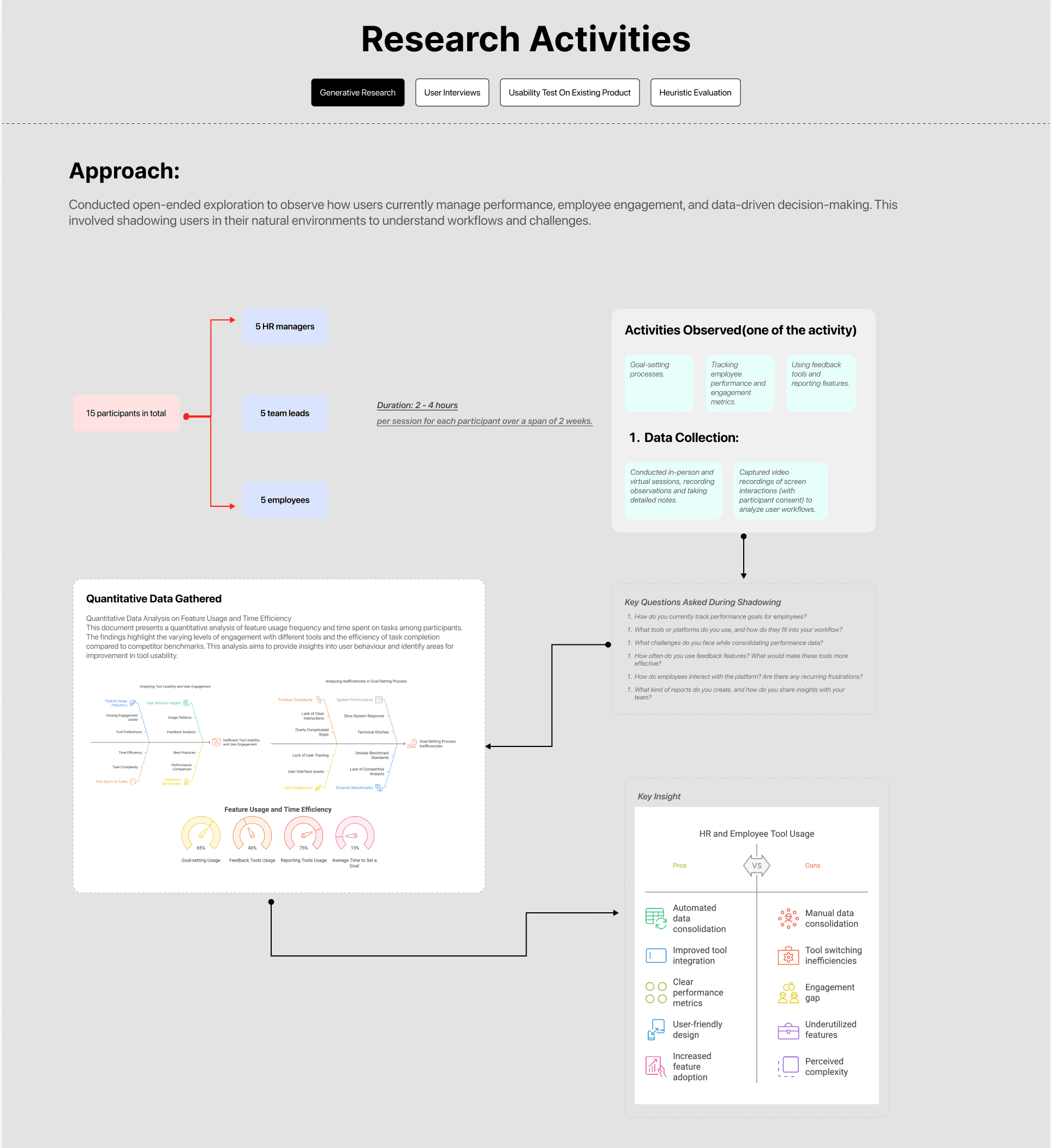
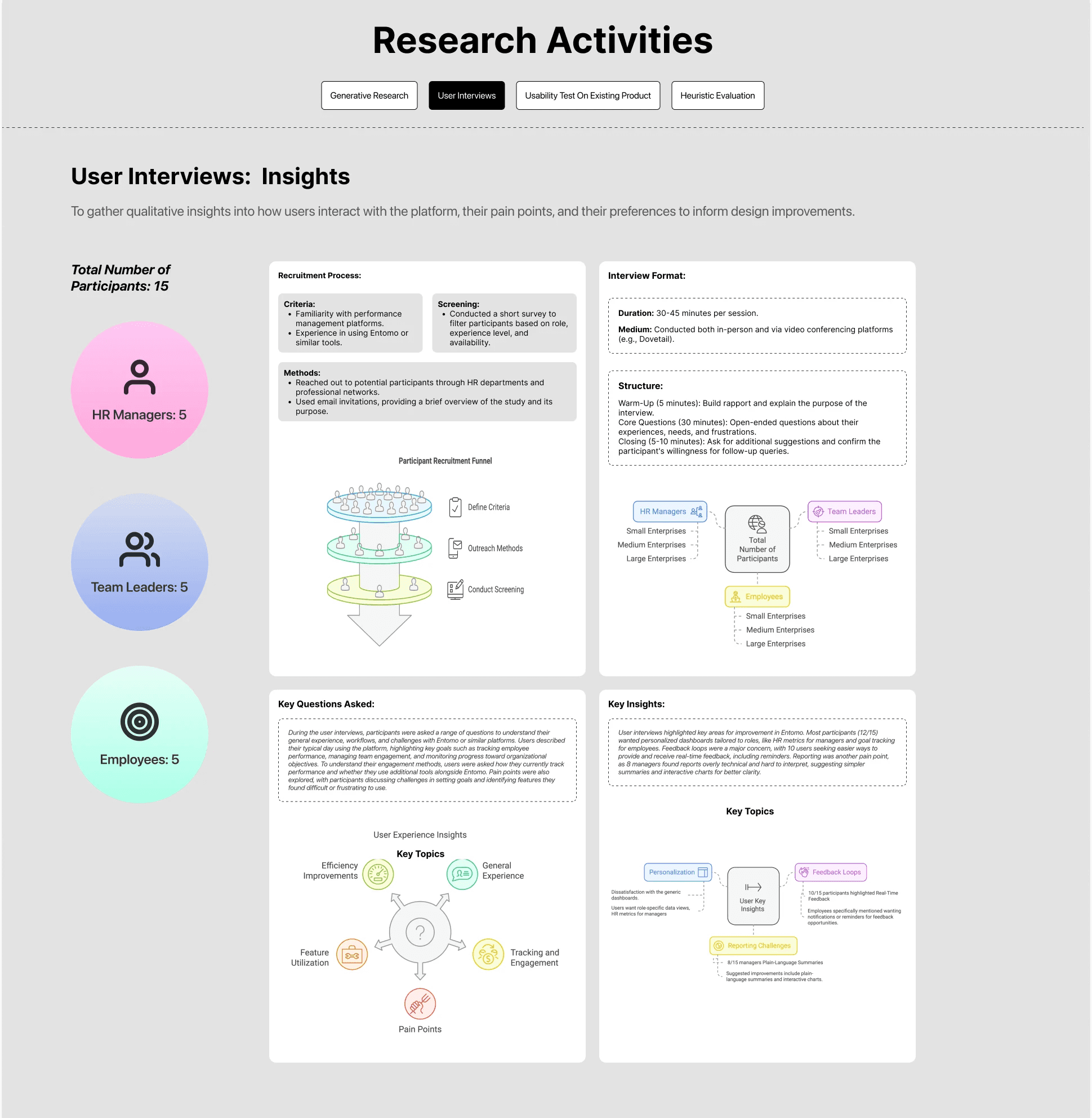
To enhance Entomo's performance management platform, I conducted comprehensive user research focusing on understanding user behaviors, needs, and pain points. The research methodology included:
Engaged with key stakeholders including:
HR leaders
Talent managers
Product owners
Conducted surveys across a diverse group of employees to gather quantitative insights on:
Platform usability
Feature adoption (learning, jobs, skills)
Pain points in navigation and discovery
Contextual Inquiry
Observed employees interacting with the platform in real work scenarios to understand:
How they search for learning content
How they explore career opportunities
Where they drop off or feel confused
Created detailed personas representing key user groups:
Individual contributors
Managers
Career switchers
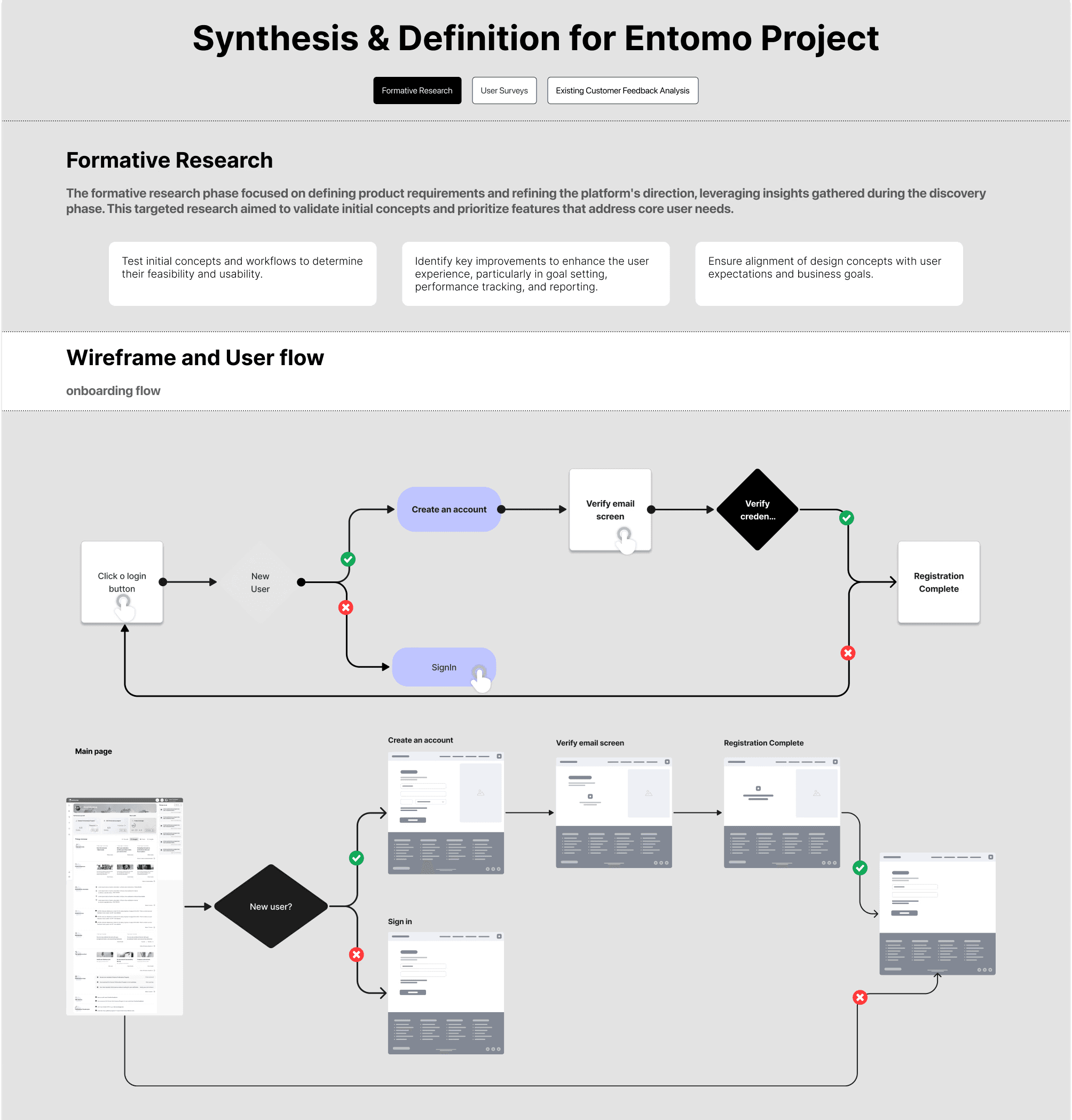
Mapped critical user flows such as:
Adding skills to learning plans
Exploring internal job opportunities
Tracking skill proficiency
Outcome:
Identified friction points, redundant steps, and lack of guidance in completing key actions.
Conducted usability testing with both new and experienced users to evaluate:
Ease of navigation
Clarity of AI recommendations
Task completion efficiency
Analyzed leading platforms including:
Eightfold AI
Degreed
LinkedIn Learning
Workday




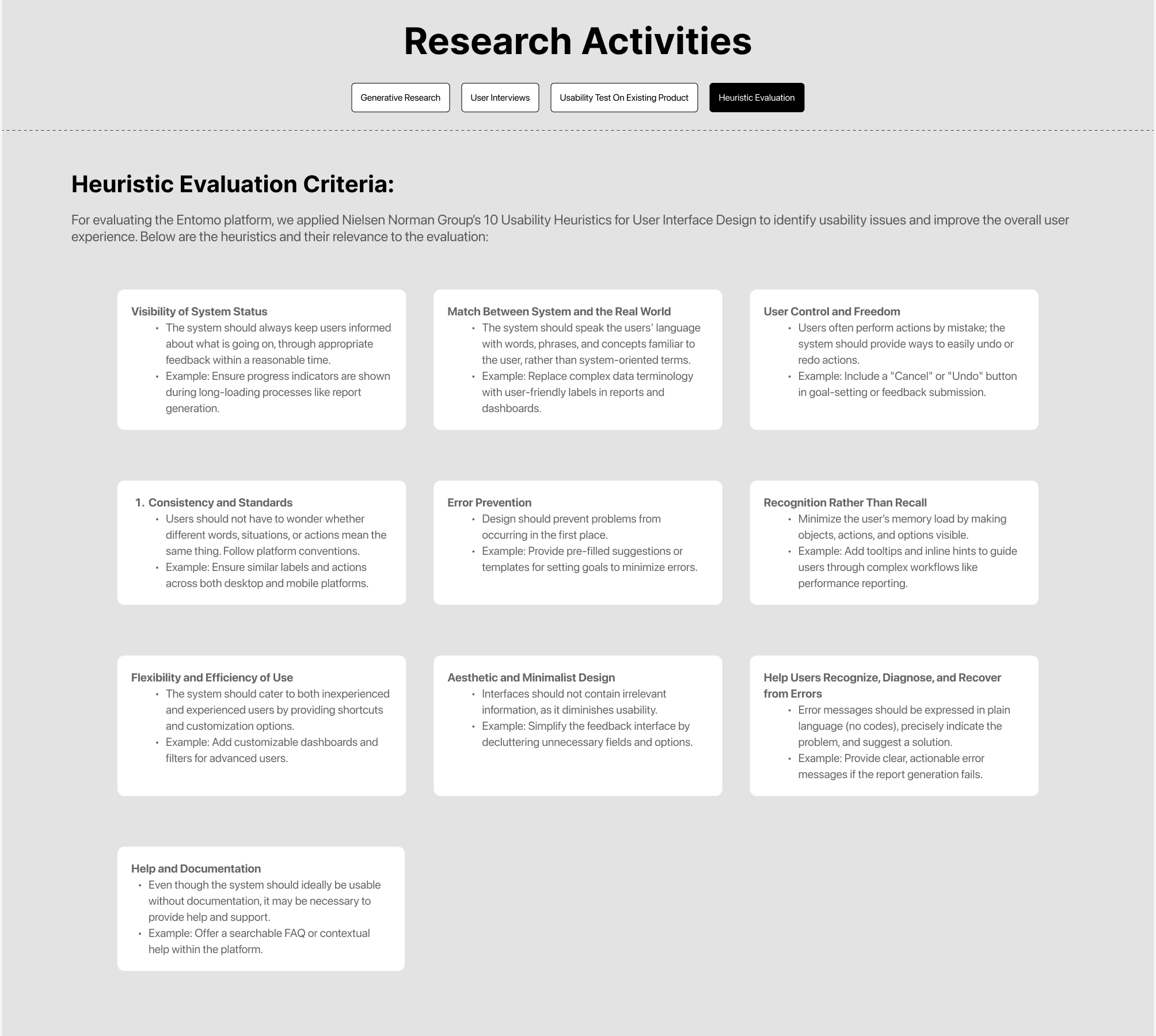
Heuristic evolution
Further, we went ahead to analyze each screen of the user flow while simultaneously comparing them across devices, we also rated these evaluations from a 0 to 5 scale. If we found that any heuristic was followed really well in the screen we gave it a green 0, the rest 1-5 scale is for poor usability heuristic in the poor to the poorest order. Here are a few insights from the report we compiled -

We have tested almost more than 10+ features….
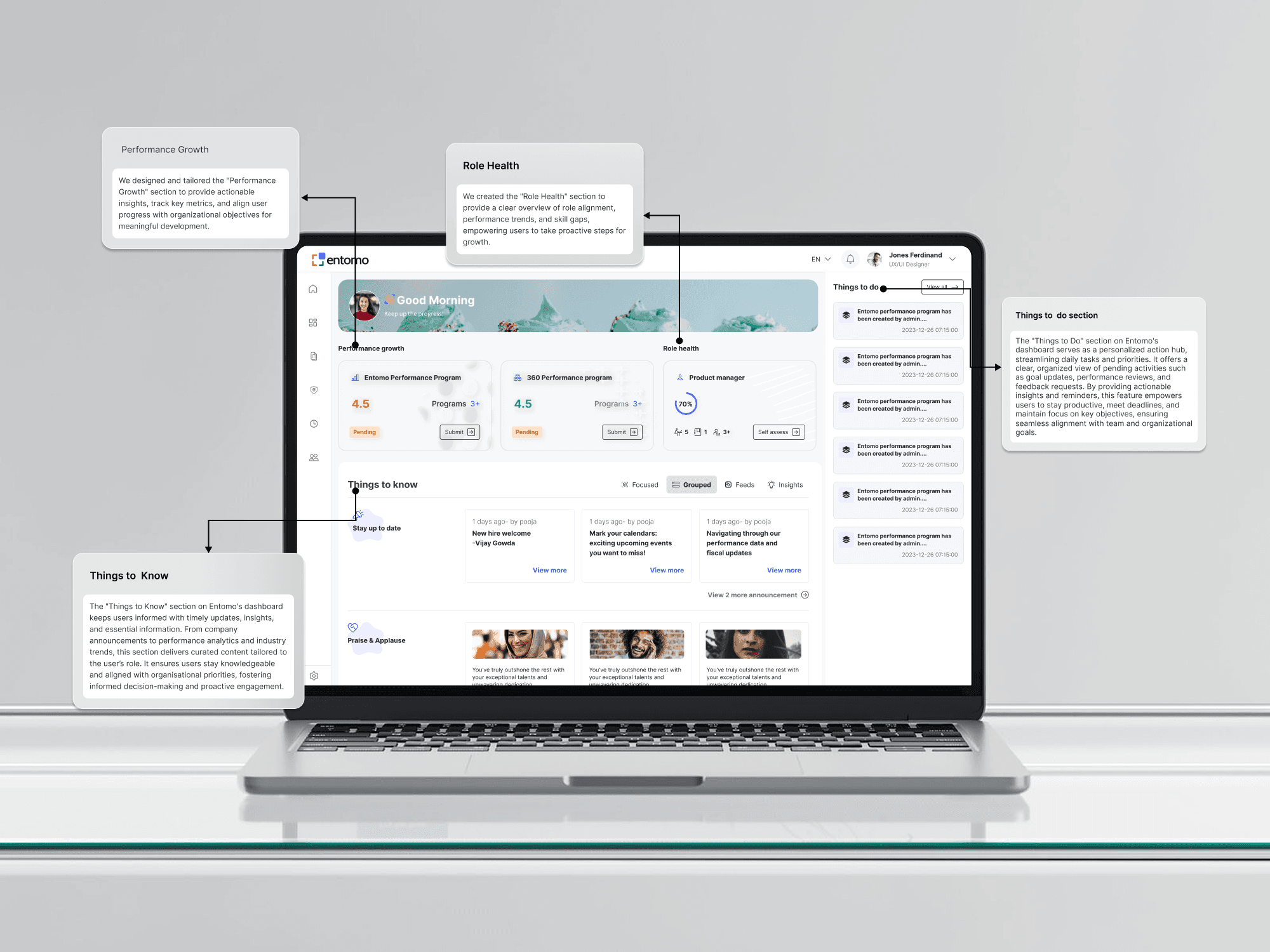
Main Dashboard
About more sections and features
Stay Up to Date: Key updates like new hires and upcoming events ensure users remain informed about critical happenings.
Connectivity Chronicles: Logs activities like check-ins and feedback for better tracking and transparency.
Membership: Highlights program participation opportunities and recognizes user contributions.
Performance Pulse: Provides updates on performance reviews and scorecard submissions to track progress.
Praise & Applause: Celebrates user achievements to foster motivation and a culture of recognition.
Check-in Corner: Displays progress updates and task completions to help users monitor their goals.
Your Opinion Matters: Includes surveys and polls to gather valuable feedback and user insights.
Sustainability Initiatives: Promotes green initiatives with polls and actionable environmental updates.
Role Navigator
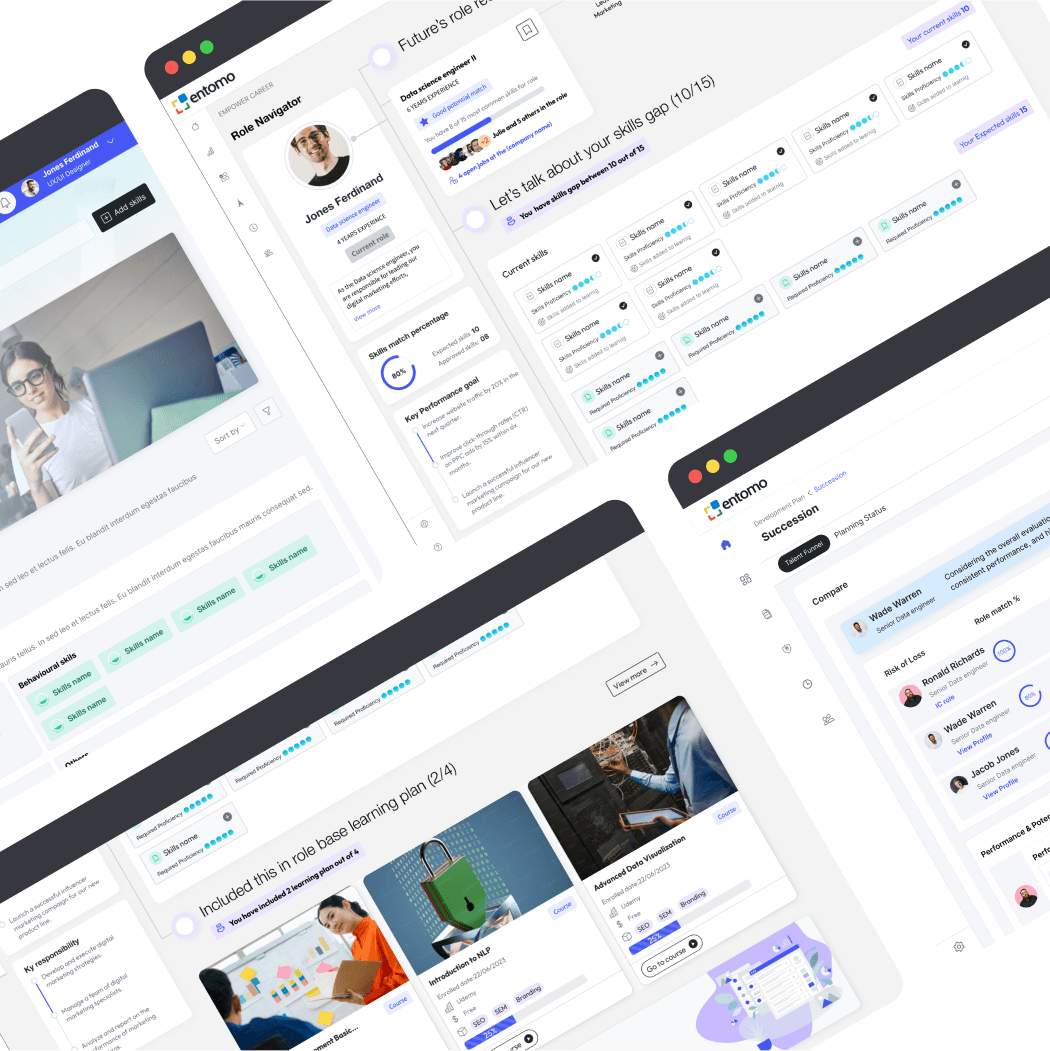
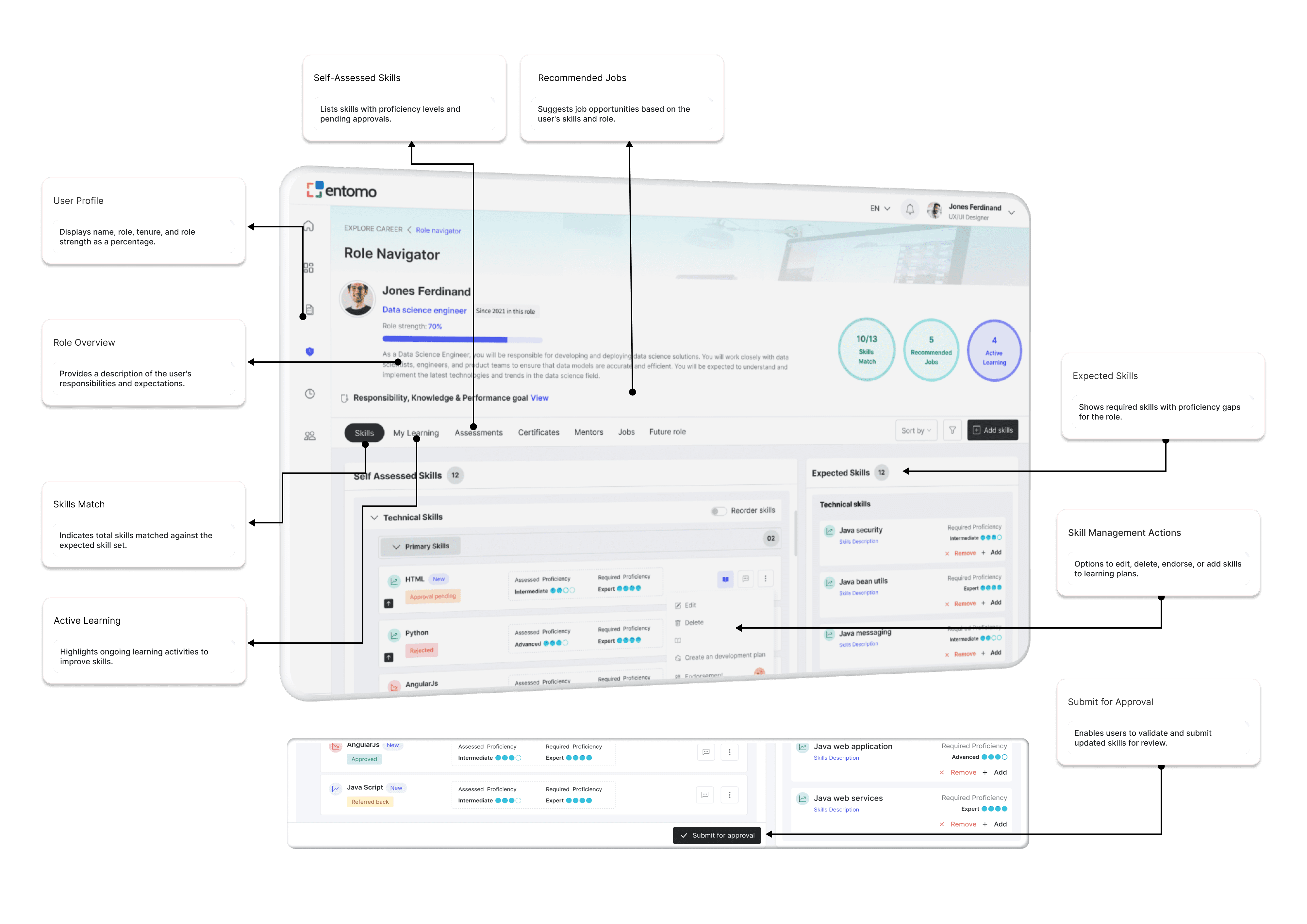
The Role Navigator screen is designed to provide users with a comprehensive overview of their current role, skills, and development opportunities. It highlights key metrics such as role strength, matched skills, and recommended jobs, while offering actionable insights into skill gaps and ongoing learning activities. Users can self-assess their skills, view expected proficiencies, and manage their development through options like editing, endorsing, or adding skills to learning plans. This screen empowers individuals to align with organizational expectations and take proactive steps toward career growth and skill enhancement.
Succession Planning
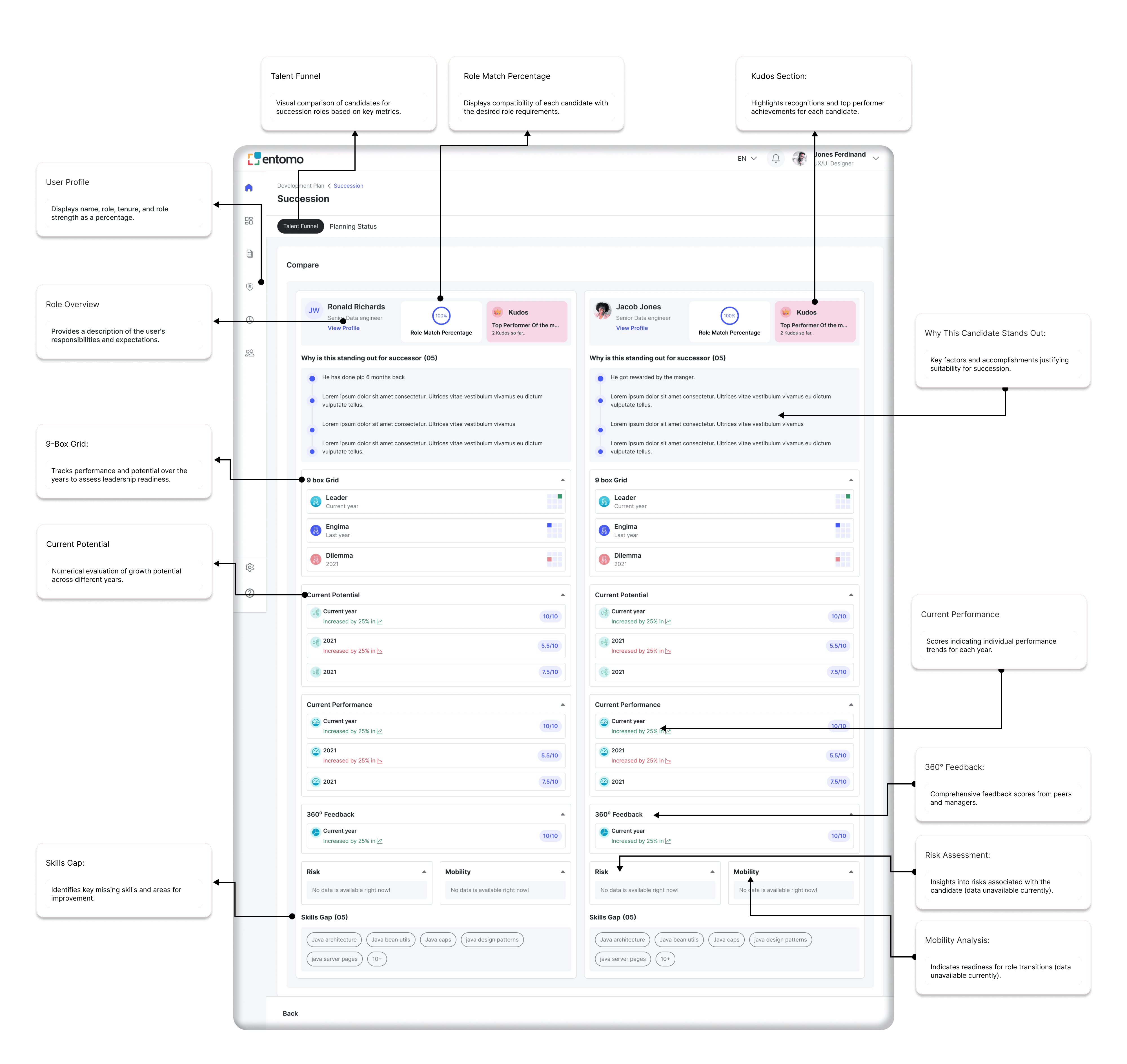
The Succession Planning screen is designed to compare potential successors for critical roles within the organization. It provides a detailed analysis of candidates' role match percentage, current potential, and performance over time. Key metrics like 9-box grid placement, 360° feedback, and skill gaps are displayed to evaluate readiness and suitability. This screen helps leaders identify top performers, assess risks, and plan for seamless transitions, ensuring organizational stability and future growth.
Skills Edit & ADD
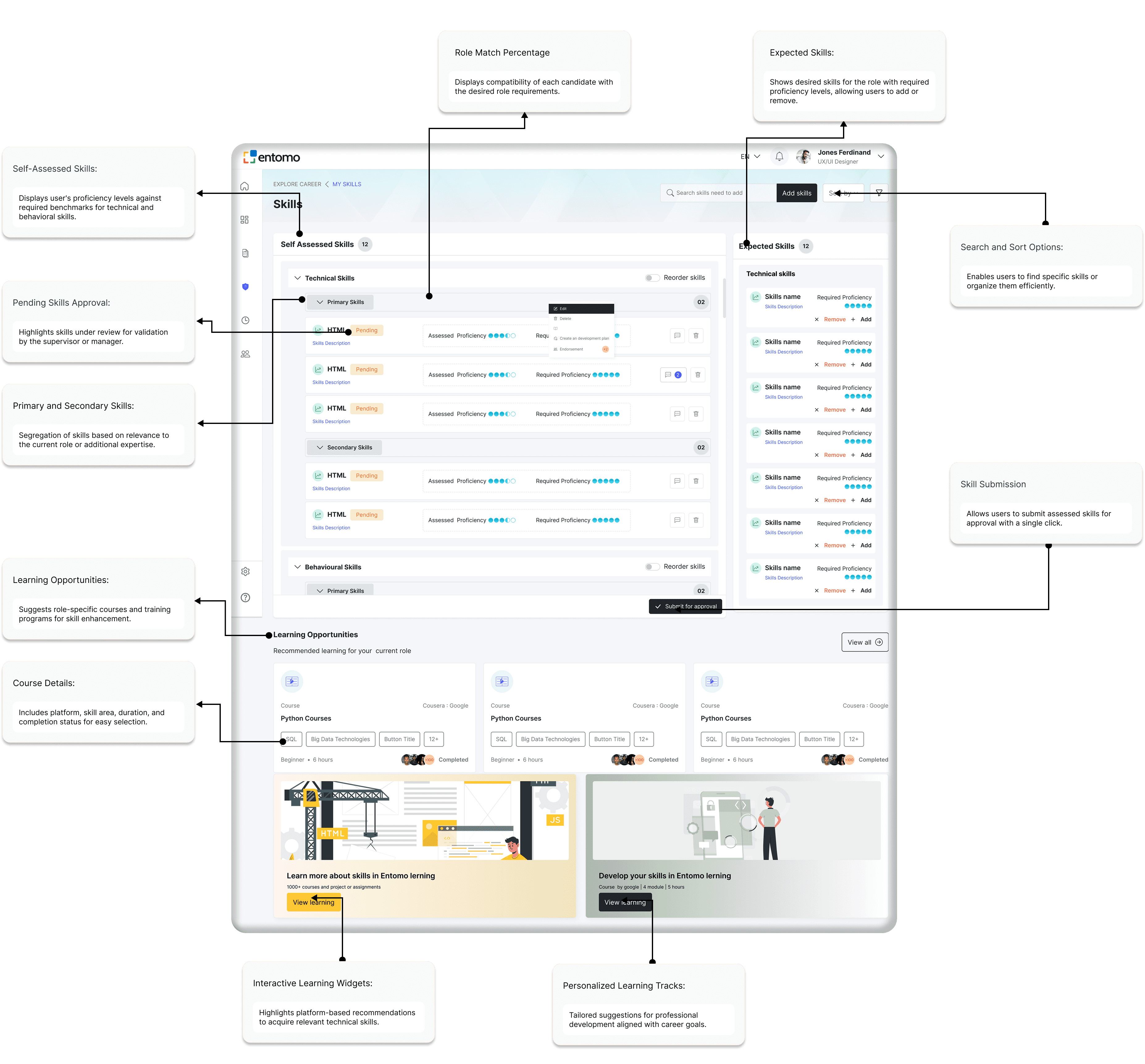
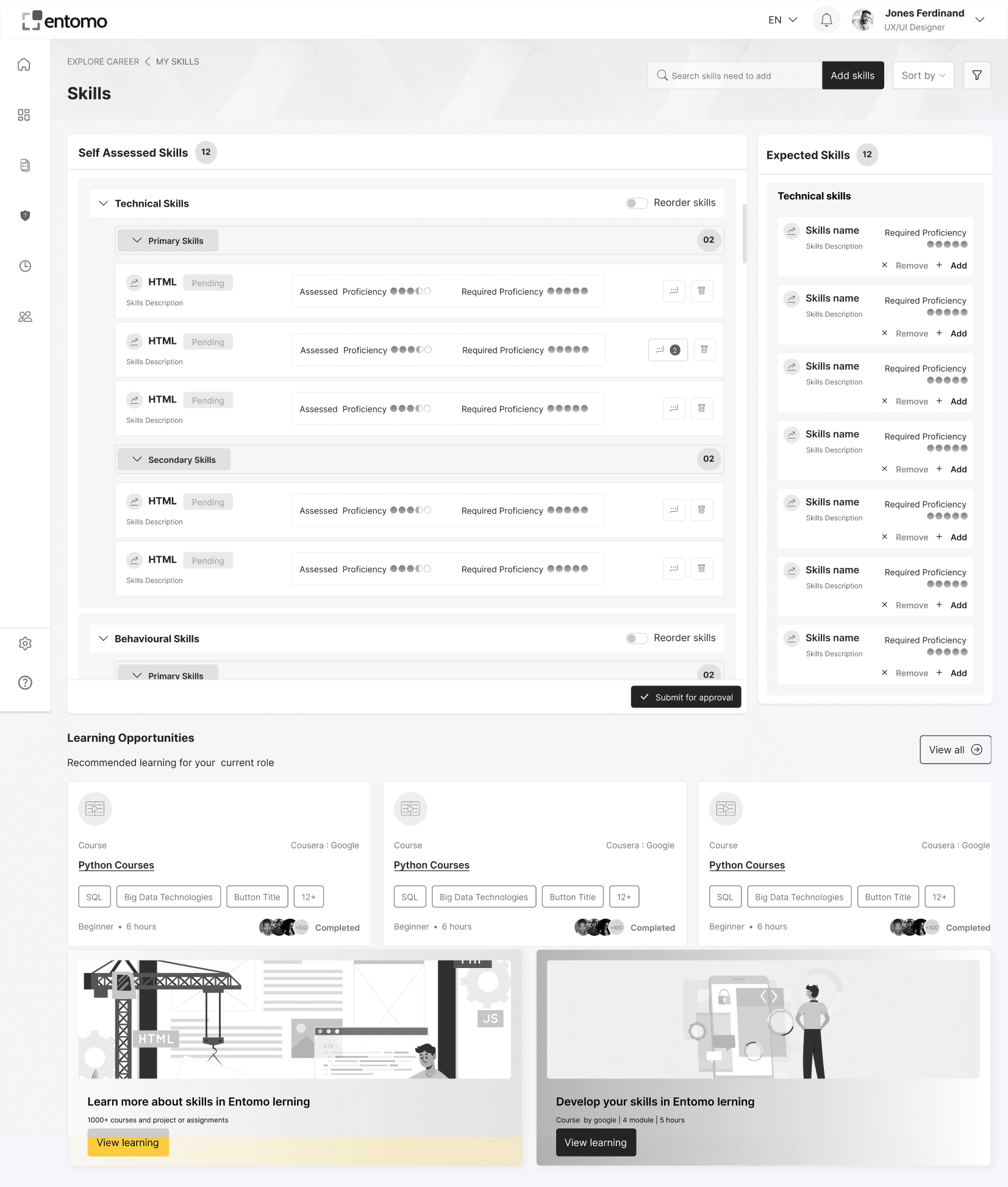
The Skills Dashboard provides an overview of an individual's technical, behavioral, and self-assessed skills, along with expected skill requirements for their role. Users can view proficiency levels, identify skill gaps, and take actions like editing, endorsing, or adding skills to learning plans. The dashboard also highlights recommended learning opportunities and courses to help users enhance their capabilities and align with role expectations. This screen promotes continuous learning and skill development to drive professional growth.

Wireframes
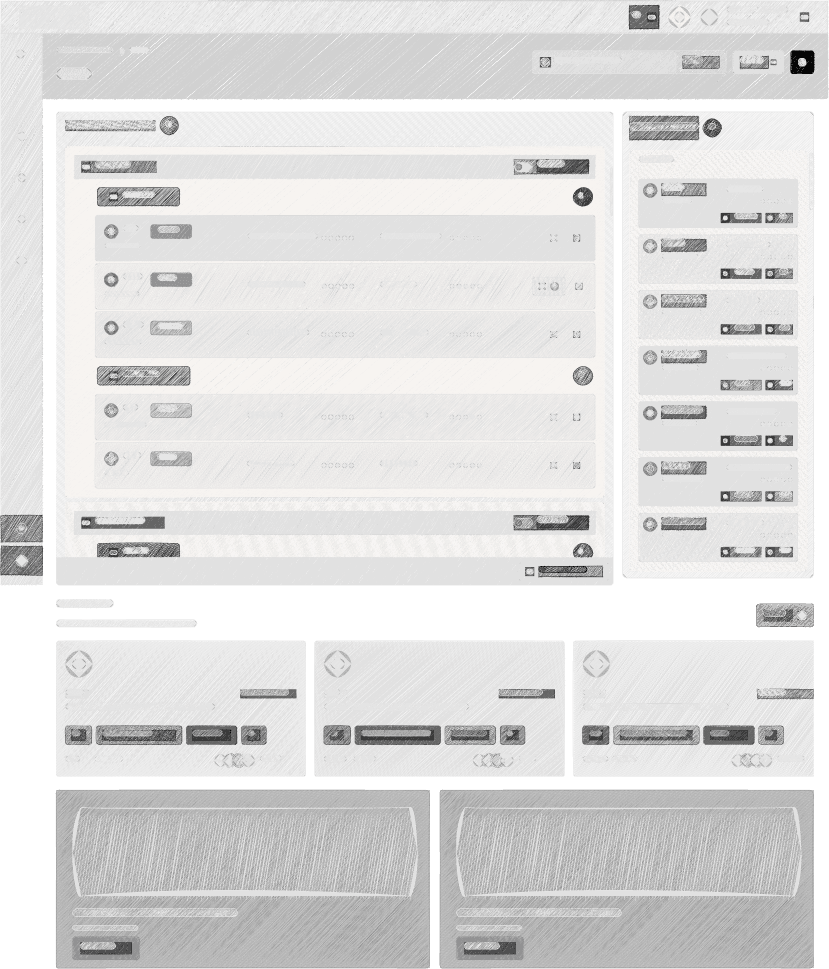
Wireframes are basic visual representations of a digital interface, focusing on layout, structure, and functionality. They help align teams on the design's purpose and flow before adding visual elements. Wireframes can be low-fidelity (simple sketches), mid-fidelity (detailed layouts), high-fidelity (realistic designs), or interactive (clickable prototypes), ensuring user-centric designs and streamlined development.


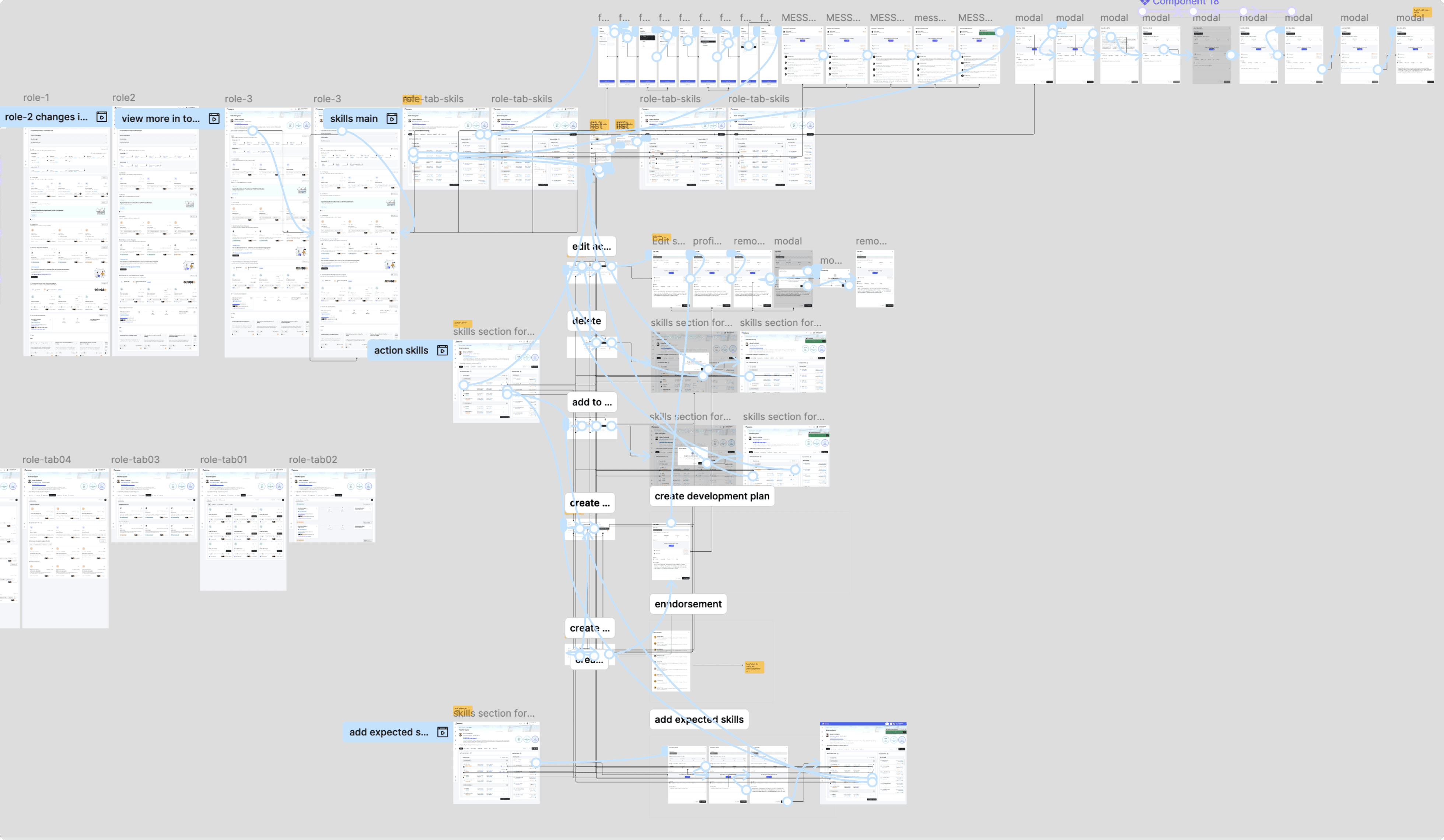
Prototype
Insights from User Testing
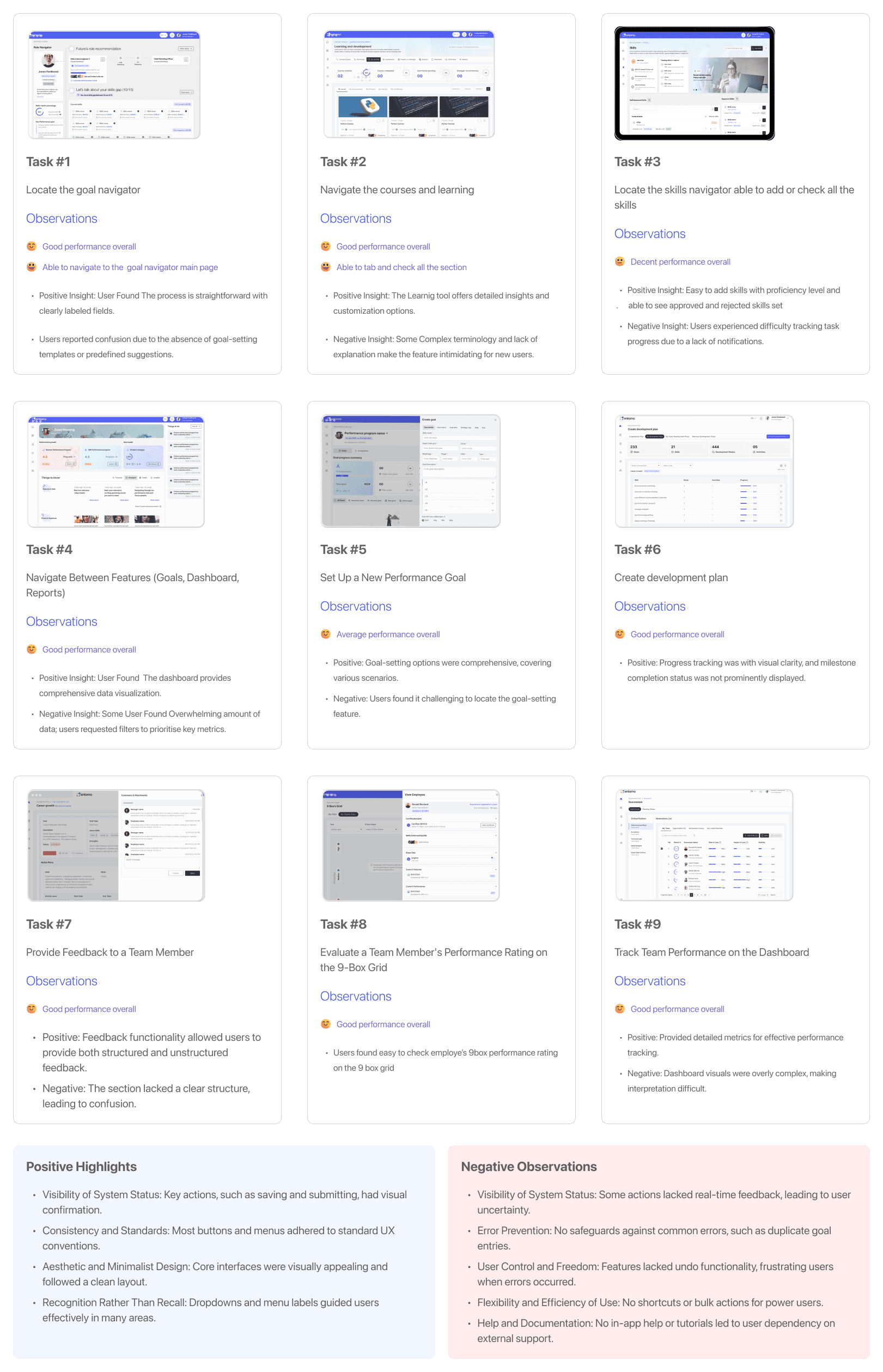
User testing revealed challenges with navigation, complex terminology in reports, and inconsistent features between desktop platforms. Goal setup and tracking workflows were found to be cumbersome, and error messages lacked clarity, highlighting areas for improvement.
Overall Results for the Entomo Projects
User Engagement: Achieved a 35% increase in daily active users due to personalized dashboards.
User-Centric Design: Achieved a 90% user satisfaction rate based on interface usability and feedback.
Performance Metrics: Improved overall performance scores by 40% through data-driven insights.
Role Alignment: Enhanced role alignment by 30% with role health and skills gap analysis.
Learning Integration: Increased course completion rates by 50% with curated learning opportunities.
Skill Development: Helped 75% of users identify and close skill gaps within six months.
Succession Planning: Enabled 60% faster identification of successors with role-matching tools.
Career Growth: Boosted employee promotions and career advancements by 25% in the last year.
Organizational Success: Improved overall team productivity by 45% through better talent management.
Innovation in HR: Reduced manual HR efforts by 60% with automated insights and tools.
Learning and take Away
Skill Alignment Matters: Aligning roles and skills enhances productivity and engagement.
Succession Planning is Critical: Effective planning ensures business continuity and readiness for leadership changes.
Data-Driven Decisions: Leveraging analytics in talent management results in measurable outcomes, such as a 45% increase in team productivity.
Personalized Growth Strategies: Tailored learning opportunities boost employee satisfaction and skill development.
Visual Design Impacts Perception: A clean, modern aesthetic contributes to building user trust and brand loyalty.